In this article I’ll discuss how to add an unlimited number of additional form elements to a form and then save to a database. The latter part is the key here as a variety of tutorials exist on adding form elements, but I have yet to see anywhere that actually explains how to manipulate these added form fields. For example, how to get values to store them in a MySQL datbase. In the example we’ll have a simple user signup form where the user can add multiple fields to describe their favourite websites. The basic Form HTML is as follows (nothing amazing, just a simple html form):
<script src="js/jquery.js" type="text/javascript"></script>
<h1>New User Signup</h1>
<form action="index.php" method="post">

  <label for="name">Username:</label>
  <input id="name" name="name" type="text" />
  <label for="name">Password:</label>
  <input id="password" name="password" type="text" />

   <div id="container">
      <a href="#"><span>» Add your favourite links.....</span></a>
   </div>

   <input id="go" class="btn" name="btnSubmit" type="submit" value="Signup" />
</form>
The only part that isn’t standard is highlighted above. This is simply the link users click to add additional form fields on the fly. To make that happen we’ll need some JQuery:
var count = 0;
$(function(){
	$('p#add_field').click(function(){
		count += 1;
		$('#container').append('<strong>Link #' + count + '</strong>'+ '<input id="field_' + count + '" name="fields[]' + '" type="text" />' );
	});
});
Jquery makes it very easy to add for elements using the append method. As we need to assign a unique name to each additional input (as we are allowing the user to add an indefinite amount of inputs) I’ll use a variable to keep track of the number of inputs added. Whenever an input is added, the counter variable increments by one. Another thing to notice is how the fields are named using ‘txt[]’. This creates an array of field names. So now when we click the ‘add_field’ link, a new input field is appended to the contianer div – view example.
The only other order of business is to save this information to a database. This would be easy if we had static field names for the whole form, but we don’t. We have the following:
<input id="name" name="name" type="text" />
<input id="password" name="password" type="text" />
<input id="field_1" name="fields[]" type="text" />
<input id="field_2" name="fields[]" type="text" />
<input id="field_3" name="fields[]" type="text" />
.
.
.
etc.
To capture this dynamic fields we’ll need to use a bit of PHP to loop through our posted array and saving the data using a many-many relationships using the following database structure – allowing a user to be associated with an unlimited number of websites:
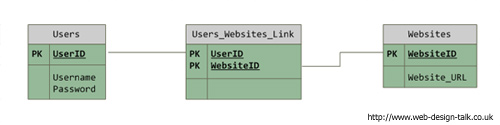
The following PHP code will grab our static and dynamic form values and insert into the above data structure. We’ll be using a class for the database to minimise the amount of code written. Firstly we’ll check if the forma has actually been submitted, grab the static values (username and password) and insert these into our users table:
//If form was submitted
if (isset($_POST['btnSubmit'])) {

	//create instance of database class
	$db = new mysqldb();
	$db->select_db();

	//Insert static values into users table
	$sql_user = sprintf("INSERT INTO users (Username, Password) VALUES ('%s','%s')",
						mysql_real_escape_string($_POST['name']),
						mysql_real_escape_string($_POST['password']) );
	$result_user = $db->query($sql_user);
PHP’s sprintf function was used to format the sql query. I also escape input to prevent nasty things from happening. Now we need to check if the user has actually added any favourite websites in order to prevent a php error if we try to find non-existant values, if they have added a field we’ll need the user id number previously inserted into the users table, as we’ll need to insert this elsewhere later on:
//Check if user has actually added additional fields to prevent a php error
	if ($_POST['fields']) {

		//get last inserted userid
		$inserted_user_id = $db->last_insert_id();
Next we loop through the added form field values. This is where naming the field as in our append function as ‘txt[]’ comes in, as all fields we added are submiited as an array called txt. Using a for each loop we can assign values to all dynamically added fields and save them to database. The $key is simply the fields name (field_1) and the $key is our actual value entered for that field. Now we know this, we can easily generate the sql statements within the loop. Firstly we add the website into the websites table, get the id of the inserted website and insert this into the the link table, using the userid from before. To finish, we display a confirmation message and disconnect from the database:
//Loop through added fields
foreach ( $_POST['fields'] as $key=>$value ) {
//Insert into websites table
$sql_website = sprintf("INSERT INTO websites (Website_URL) VALUES ('%s')",
mysql_real_escape_string($value) );
$result_website = $db->query($sql_website);
$inserted_website_id = $db->last_insert_id();
//Insert into users_websites_link table
$sql_users_website = sprintf("INSERT INTO users_websites_link (UserID, WebsiteID) VALUES ('%s','%s')",
mysql_real_escape_string($inserted_user_id),
mysql_real_escape_string($inserted_website_id) );
$result_users_website = $db->query($sql_users_website);
}
} else {
//No additional fields added by user
}
echo "
<h1>User Added, <strong>" . count($_POST['fields']) . "</strong> website(s) added for this user!</h1>
";
//disconnect mysql connection
$db->kill();
As a result, our database should be populated as follows (these are screenshots from phpmyadmin):

You can view the source of php file here or download the original source files (you’ll need to open classes/db.class.php and populate the sql variables with your own database details). The MySQL source to create the tables is also included in the source files.

Nice idea, but you should be really using isset when checking if the more fields have been added. For example isset($_POST[‘fields’]).
How would i add multiple areas each time you add am input?
Thanks for your comment.
I recently discovered how to do that. It’s not actually that much extra work to say add (in relation to the examples used in this article) more fields each time the a’dd an input link’ is clicked E.g. a website name, a website url and website comment would be added, instead of just a single website field. I’ve found this is very useful for a lot of projects.
I’ll post an article explaining how to do this shortly.
@Drakar
Yes I agree as it’s good practice and not using it causes warning to occur on some server setups. However, for simplicity I left it out (read: forgot 🙂 ) to include it here – not that it would change whow the example works in any way.
this is too good thanks everyone
Rob – Thanks! Excellent example and very clearly and concisely written.
@Joseph
Added a new post explaining how to do this – http://www.web-design-talk.co.uk/94/getting-multiple-array-form-values-with-php/
Great work!
How would you add the remove fields function to this example?
@Lollodev
All you’d need to do is add a delete icon/link next to each field – for this you’d simply append a little bit of extra html to what we have already, adding the ‘count’ variable to the field id. E.g id=”deletelink_’ + count”.
You’d then need a function to capture the click event – again quite self explanatory. In this function you’d simply pass it the element name and use JQuery’s remove method – see http://docs.jquery.com/Manipulation/remove
I’ll try to add a new post about this soon, as it’s quite useful to delete added items.
Is there a way to remove the fields after adding it? Have you posted an example for that on your website?
@gtenor
If you look here I briefly explained it: http://www.web-design-talk.co.uk/58/adding-unlimited-form-fields-with-jquery-mysql/#comment-143 – should explain it if you know your way around JQuery.
However, I’ll be explaining that feature in a new article as a lot of people (including yourself) have requested this and there are a few cross browser issues (mainly IE, who would have guessed? 🙂 ).
Hi Rob,
I am also interested to see a clean way of removing fields..Thanks :)..
Have been meaning to add this feature to my example – loads of people have requested this by email too. Am just having trouble getting around to it as I’m so busy at the min 🙂
I’ve finally implemented the add and remove form elements :). They’re working superbly; yet I’ve done it in another way, not by the way you suggested in your comment :).
@gtenor
Hi,
Would be interested to see how you did that? The main culprit is IE6, does it work in that browser?
@gtenor
Could you please share your solution to remove form fields
Certainly!!
Altough I cannot give you my code because I’m using for commercial site that I’m building, I’ll give you a lead.
I’ve got this useful piece of information from a forum:
“For dynamic addition/removal, it’s easy enough to use the native DOM traversal keywords, rather than jQueries “$(this).parent().get(0)”
Ex,:
Hope that helps!! 🙂
@gtenor
Ex.:””
ugh, didn’t know you can’t stick a piece of html code on here. Here’s the link: http://www.ozzu.com/programming-forum/using-jquery-dynamically-add-remove-form-elements-t93694.html.
Thanks guys.. I found this very interesting jQuery plugin to add/remove fields http://vipullimbachiya.com/
@gtenor
Yer that’s kind of the way I was thinking, as JQuery’s .remove() method doesn’t seem to work on all browsers for removing inputs. Nice find
http://vipullimbachiya.com/?p=209
One big problem … you lose position on your form.
To retain position add this line at the bottom.
return false;
@billmce
I’ve not noticed this personally. What browser are you using?
Hi. Have tried to implement the remove fields but can’t get it right. Could you explain how to do this?
Hello, do you have any idea how to make it run in WordPress?
@Thomas
This is on my list of things to do. I’ll a reply soon.
@andrew
Depends on what you mean really? Do you mean getting the JS or database stuff to work in WordPress?
Saying that, my example doesn’t use anything amazingly complex so you should just be able to add the code to any wordpress site as it’s just simple JS and PHP.
Excellent tutorial thanks for sharing
People have asked for the code to remove an added input. I’d actually recommend putting your input and remove link in a paragraph tag. For the remove/link simply added the following attribute to your link – works in all the major browsers too:
onClick=”$(this).parent().remove(); return false;”
What is the advantage of creating a link table when you don’t know ahead of time the range of entries to the Website_URL field?
@Kris
As users can add many websites. E.g. in the example, the user has added 6 websites, all of which are referenced in the link table. The link table is needed because the amount of sites a user can add is unlimited (one of the reasons the field name are as an array E.g. field[]). The example wouldn’t work without the link table.
@Rob
If we knew ahead of time what the range of possible url’s were and we had our users select from them, then we could re-use our website fields and then we would have a true many to many relationship. Each website could be linked to multiple users and each user could be linked to multiple websites. That would be a many to many relationship.
In this case, though we have a known user (singular) adding an unknown number of websites (probably plural), so we have a one to many relationship.
Couldn’t we simply skip the link table and add a user_id as a foreign key to the websites table? The insert foreach loop would still work and we could simplify our sql to something like this:
$sql_website = sprintf(“INSERT INTO websites (UserID, Website_URL) VALUES (‘%d’, ‘%s’)”,
$inserted_user_id, mysql_real_escape_string($value) );
Ah, see what you mean now, misunderstood you beforehand 🙂
Yes that’s definately another (abliet probably better) way of doing things as you loose a join in your SQL query, which is always good. The reason it ended up as it did is because I was working on a project at work that required that table structure.
another awesome tutorial. it was so nice to read and easy to follow.
Thanks for the tutorial… have a quick question and should be fairly easy compared to the rest.
I have a form that I’m wanting to show certain elements depending on which checkbox is checked. Will your tutorial accomplish this. (not from the way it is now… but in general… i’ll recode).
Reason for adding them dynamically vs. just .show/.hide with jquery is for validation. I won’t be inputting “some” of the hidden stuff but my php script is already setup and ready for those that will be inserted.
In a working explanation:
I have 4 “select” fields that should show on chk1.click. They are hidden with jquery on load and “slideDown/Up” on click now… but I can’t use a validation engine as I can’t make them required.
If I can dynamically add those fields to the form on click…then I can make em’ required. Thanks.
@MeFoo
Thanks for the comment. By validation, I assume you mean server side validation?
Also, can you execute your server side validation rules based on the value of your checkbox. E.g. if box is checked, validate field x and y. if box is not checked, only validate feild z.
If you’re using client side validation then it depends which one. The majority of them add a required class (which is easy to do from the above). What engine/code are you intending on using? You may be able to use some code I wrote last week for an orders system – E.g. same sort of idea – click the add button to add a new item to the order (qty, name, desc, price etc.) and then validate each one of these when I add the order. Fort me, I found it was all above how you mane you dynamically added fields. Anyways, give us a shout if you want this 🙂
Well…. I’m already using Position Absolutes validation engine.
http://www.position-absolute.com/articles/jquery-form-validator-because-form-validation-is-a-mess/
Because of the way the validation engine is setup… if I add a class to an element that is hidden…the end user will never see some of the required fields. As a solution to that problem… I intend to dynamically add those fields via your method to the form on the fly which will solve the validation issue as those fields will only be on the form “IF” said checkbox is selected.
The fields are predefined so I don’t need to use an array and for the fields I will be adding to my db… I’ve already got the script setup so that is not an issue.
The only issue that may become a problem is the placement but that seems trivial at this point.
Thanks for the quick reply.
sorry for the double post… felt the need to visually show ya.
Using your example above… I’ve added your stuff to my form… with the exception of the link(replaced with checkbox)
Not sure of coding on this site…
http://i53.tinypic.com/33m94lj.jpg
[img]http://i53.tinypic.com/33m94lj.jpg[/img]
then when the checkbox is checked… it should show …
http://i55.tinypic.com/2wrlwe1.jpg
[img]http://i55.tinypic.com/2wrlwe1.jpg[/img]
By dynamically adding that predefined field to the form.
Your method seems like overkill for what I need… but I understand your example is geared for other uses and teachings.
sorry again for triple post… but I’m really desperate for some way to work around this.
So far…. i’ve setup a test div on my form and a test checkbox.
echo ”;
echo ”;
echo ”;
The jquery is where i’m struggling. The “click” event by the checkbox should amend the form to show the text field and add it to the form.
$(“testchk”).click(function () {
if ($(“#testchk”).is(“:checked”))
{
$(“#test”).append();
}else{
}
});
Note*** Using ‘ ‘ will break the code. I’ve also wrapped the “input” with quotations… no luck.
html stripped… sorry.
Try pasting the code at http://pastebin.com/ 🙂
Checkbox always seemt o cause me issues too 🙂
With JQuery I always end up using soemthing along the lines of:
if ($(‘#testchk:checked’).val() !== undefined) { //do stuff
or
if ($(‘#testchk’).checked == false) {
Can’t remeber which works off the top of my head 🙂
EDIT: you could also try the change event:
$(‘#testchk’).change(function () {
if ($(this).attr(“checked”)) { //do stufff..
It’s not really the checkbox that’s the problem… it’s the append code where I’m getting shafted.
I already use 3 checkboxes as it stands now to “slideDown/Up” div’s so I know that the syntax there should be right… but appending the document is what is killing me.
And I agree with ya… these checkboxes are oh so handly… but a real pain in muh A.
http://pastebin.com/wiVuKQv6
(Note** I didn’t mean for the trailing “;” to be after the “input”… typo)
Appreciate your help with this… have it figured how to append… now working on a remove.
here’s is how i’ve written it (mind you the remove part doesn’t work)
http://pastebin.com/usGLJ73J
Thanks.
to remove the field from the previous code use this after the “else {”
$(“#texttest”).remove();
Hope someone gets some use from this… I’ve tested it with the validaton engine… doesn’t work. 🙁
Hi, what tool did you used for data structure drawing? And another question how would you do with PHP if there would be a website title field and link field? Thanks indeed for your article and massive help.
@ Mindaugas
Just used MS Visio iirc. Not sure what you mean re the second question though?
@ Rob
I mean, how you would do your coding if there would be another field like link title.
Im using this jquery plugin to add more fields to my form. http://vipullimbachiya.com/jQuery/Plugins/MultiField/SampleMultiField.htm#example
and i want to add two dynamically added fields to my database.
All conception is the same like your tutorial i just have one more field to add to my datebase. 🙂
thanks indeed
@ Mindaugas
Ah, yer. You need to add a new field into your database and amend the sql statement to insert the record (the link code would remain the same). You’d also need to change the javascriopt i used to create the actual fields.
Hi All
I have some server side validation being applied to my form which sends the user back to the form if there were issues.
When returned the dynamically added fields are not displayed.
is this possible with this jQuery setup?
@Peter
That’s kind of out the scope of this tutorial – you could validate the fields as soon as another is added and display the message then. However, if you want maintain your view you’d most likely need to set and retreive a cookie – regenerating your original view based on your cookie – shouldn’t be too hard to accomplish. However, validating fields as you add them (say when I add a new field) would make most sense to me and make things a lot easier. If you post your code, or a link to your site or email me, I’ll have a look for you 🙂
Hi, thank you there 🙂
I’m still trying to figure out how to create “remove favourite links” with .remove(); and it still won’t work. Can you help me with my code?
$(‘#remove’).click(function() {
if(count > 1) {
$(‘.field:last’).remove();
count–;
}
});
Thanks for your code and time 🙂
OK I manage to get it working. Big thanks to you Rob and Jimmy from http://www.callmenoob.com/pages/post/How-to-add-remove-textbox-dynamically-with-jQuery-modified
thanks everyone 😀
Why in the world did you use sprintf? There is absolutely no need for it and it makes the code much more confusing.
Granted, it makes the code more complicated on this site – a small limited area. However, in your normal editor it makes the code much much easier to read. sprintf is simply shorthand for outputting some preformatted info to the screen, it’s just down to personal preferance and if you wish to write additional lines of code. 🙂
Hi, and thanks for sharing this code. I want to use this in a simple invoice system but I am struggelig to figure how I can use this with my system. I have a table called invoices and a table called products. I want to assign the products to the invoices I create
I want to do something like below:
INSERT INTO products (prodname, qty, description, price, vat, total_price) VALUES (‘%s’)”,
Then I want the products to appear on the correct invoice which they were added.
But I am stuck here, any help is greatly appreciated.
I found your other post with a solution to that and I am using something like this:
for ( $i=0;$i<count($_POST['qty']);$i++) {
{
$qty = $_POST['qty'][$i];
$description = $_POST['description'][$i];
$base_price = $_POST['base_price'][$i];
$vat = $_POST['vat'][$i];
$total_price = $_POST['total_price'][$i];
}
Works like a charm 🙂
sir, could you please give an example on how i will get the values if i want to add unlimited dropdown box.
thank you in advance :]
Hi, do you have an email that I can contact you? I can’t seem to get the ‘adding form fields’ working! Thanks in advance!
I am trying to use this on a project. I’m wanting to be able to add more text area’s that will be notes. How would I go about using this and creating a new column in my database and passing the value from each text area in the form to a new column in my database? It needs to create the new column for each text area..
Example
User fills out the rest of the form. Fills out the first text area notes and then if needed, clicks “Add more”, another text area is loaded in the form, filled out and then all information is saved to the database when submitted. The rest of the of form goes into static columns that I’ve setup in the database but the notes go into separate columns depending on how many the user added on the form..
Any help would be greatly appreciated!
Thanks
Thanks for the comment. You’ll need to loop through an associatative array with PHP and name your foemd fields slightly differently. In fact, I wrote a whole article about this very subject 🙂 See http://www.web-design-talk.co.uk/58/adding-unlimited-form-fields-with-jquery-mysql/
plz provide the similar code in JSP.please
If you can’t produce the above very simple code using JSP then I think you read up on the language more 🙂
Thanks for the tutorial, it works great. I’m trying to tweak it abit. First, I want to have one of the website links on the page at load. That’s not the problem, I would then like to have the others start counting at 2 instead of 1. I have searched and can’t seem how to figure this out.
Second question. I am using php to generate most of my fields. How can I pass the php information into jQuery. When I place my php code into: $(‘#container’).append(, I get a blank page.
Thanks for your help.
Hi Good article but could you please help me in editing form data.
i.e How to update form again if user want to modify any website link or want to delete any link.
You have to do the following:
How would you go about referencing those dynamic fields to use later within the same form? For example, I need each of the dynamic fields to trigger options being pulled from MySQL into another select field. Thanks!
If I’m underatanding correctly, you need something called “dependant dropdowns”. This is a litrtle out of the scope of this article, as it was only intended as basic introduction.
Yeah. That’s what I’ve been researching. I just can’t figure out how to dynamically call the dynicamic ID’s created here to then reference in the creation of further dependent dropdowns. I appreciate your response though. I’ll keep working on it. I do love this method though for creating stand-alone fields. Thanks!
If you post or email me your code I can take a look. But if you;re having difficulty calling dynamically added elements it will be down to the down. YOu’ll probably have to use JQuery’s .live (now .on) handler to keep track of changes to the DOM.
Great article! just what i’ve been looking for.. Still newbie here; I just noticed that name=”fields[]” (array usage) is possible! learn new things everyday 😀
Hello, nice tutorial . I’m trying to add multiple fields , lets say 2 so we have this one – name=”fields[]’ and
name=”fields2[]’ but trying to insert into the db seems to be always NULL or get the same ID as name=”fields[]’ .. so my question is does anybody know how can I add 2 dynamic fields then poste to data base in the link table .. and if you have time how to link 3 tables ex: training, reps, set … ive working on this for 1 week and I cant get anywhere … braind out there help a noob… thx
Hi Rob
Your script is very interesting…
I’m working on a project close to your script but i tried to edit it to sweat my project but i couldn’t…
I wonder if you can help me into it…
the script i’m working on is like an invoice…
the header area is the main data like date from , to, customer, t, and so on
the invoice body is like a table with colouns and rows…
the first row is headers: department (drop menu), store (drop menu selected from taable stores), qty (text), discountable (check box)…
and an Add New Record button that adds a new row…
then it will insert all the records to one table (id, date_from, date_to, customer_name, department , store , qty , discountable, … )
I believe it’s peace of cake for you but i’m not good in jquery and ajax…
Hope you can help me..
Thanks & Best Regards
Haitham Fouad
I want to add product order table dynamically multiple column and it will save with datewise mysql (order and orderdetails) table
I am not good at Javascript/JQuery/Ajax.I wanted to restrict the number of dynamic filed of user .Say user can insert maximum 5 website link only.How can I achieve this?
YOu’d need to do this on the client and server side. On the client side, set a counter. If the number of fields added exceeds this, do not append a new row. Do exactly the same thing in your PHP code – limit or do not process more than the specified number of fields.
Hai,
I have problem to do in Jquery PHP.
Because im new in php develop system, i have problem to do search value ID and display in the next fields in same row. Then add row search another ID and display result in same row different textbox and that values will be insert to mysql.
Step:
1- Keyin text box to generate multiple row (examples display 10 row)
2- Each row have search function to display the record in same row for next fields (example: Search Name and display detail such a Nationality, DOB, Department (data inside table ‘staff’)then input the another values like Downpayment, Fees and Discount (keyin and save to another tables ‘payment’. This process will be continues to the next row and do the same things. (So all of this can save into tables payment))
3- After 10 was keyin and clicks submit then the record will recorded in mysql table.
Please help.
Hi Rob i found your tutorial very easy to understand and it is very helpful. I also shared a tutorial which is similar to yours, i hope you will also like it.
https://www.allphptricks.com/add-remove-input-fields-dynamically-using-jquery/